A mini PC is a complete computer in a very small box, often small enough to hold in one hand. It has a processor, memory, storage, ports and wireless connectivity like a regular desktop, but takes up a fraction of the space and uses less power. Mini PCs have become popular in offices, schools, shops and homes. This guide explains what they are, what they are good at, and when a full desktop is still the better choice.
How is a mini PC different from a desktop?
The main difference is size. To fit everything into a compact case, a mini PC uses laptop-class or efficient desktop processors, compact memory and M.2 SSD storage. Most mini PCs can be mounted behind a monitor using a VESA bracket, so the computer disappears from the desk completely.
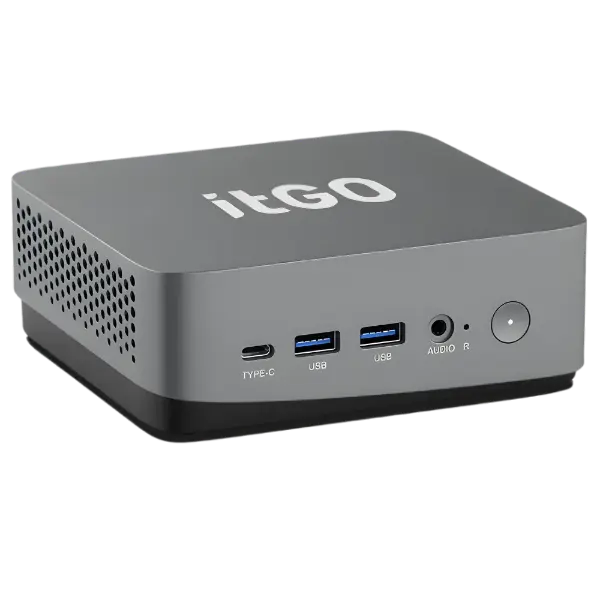
Benefits of a mini PC
- Saves space: ideal for small desks, counters and shared workspaces.
- Lower power use: efficient processors and smaller power adapters reduce electricity costs, which adds up across many systems.
- Quiet: smaller fans and lower heat mean less noise.
- Easy to deploy: mount behind a monitor, under a desk or inside a kiosk.
- Use your own display: unlike an all-in-one, you can pair it with any monitor or TV.
Where mini PCs work best
| Use case | Why a mini PC fits |
|---|---|
| Office workstations | Handles email, office suites, ERP and browser apps with a clean desk |
| Digital signage | Mounts behind a screen and runs content all day with low power use |
| Kiosks and self-service | Fits inside enclosures at banks, hospitals and retail stores |
| Classrooms | Connects to projectors and smart boards without a bulky cabinet |
| Thin-client replacement | Runs virtual desktops while still working offline when needed |
| Home and study | A compact computer for online classes, work and entertainment |
Limitations to keep in mind
- Limited graphics: most mini PCs use integrated graphics, so heavy 3D design, gaming or AI work needs a desktop or workstation.
- Fewer upgrades: you can often upgrade RAM and SSD, but not the graphics card.
- Fewer internal drives: usually one or two storage slots.
How to choose the right mini PC
- Processor: an Intel Core i3 or AMD Ryzen 3 handles basic office and signage work; Core i5/Ryzen 5 suits most business users; Core i7/i9 or Ryzen 7/9 suits power users and creative work.
- Memory: 8 GB is a minimum for office work, 16 GB is comfortable for multitasking.
- Storage: choose an NVMe SSD for fast boot and app loading.
- Ports: check the number of USB ports, display outputs (HDMI/DisplayPort) and whether you need wired Ethernet.
- Warranty: mini PCs often come with an external power adapter, so make sure it is covered.
itGO mini PCs
itGO offers two mini PC series, designed and assembled in India: Atom with Intel Core processors and Orion with AMD Ryzen processors, each available from entry level to high performance. They are GeM-ready and covered by itGO’s warranty, including the power adapter. Explore itGO mini PCs.
Frequently asked questions
Is a mini PC as powerful as a desktop?
For everyday office work, a modern mini PC feels just as fast. For graphics-heavy work, a desktop or workstation with a dedicated graphics card is better.
Can a mini PC run two monitors?
Most business mini PCs support dual displays through HDMI and DisplayPort or USB-C. Check the model’s display outputs.
Do mini PCs overheat?
A well-designed mini PC is built for continuous use. Leave some space around the vents, especially inside kiosks.
Need help choosing the right systems?
itGO designs, assembles and supports desktops, all-in-one PCs, mini PCs, workstations and servers in India, with GeM-ready configurations and warranty up to 5 years.

The itGO team at Mek Peripherals India Private Limited writes practical guides on business computers, servers, workstations and GeM procurement.